
What Fitbyte Is
Fitbyte takes an audio or video file and a target size, then encodes an output that lands inside that budget. It's a single Python file with a curses TUI and a scriptable CLI, and its only dependency is ffmpeg (with ffprobe) on your PATH. Two interfaces share one engine: a curses front-end when you run it bare, and a flag-driven CLI when you want to script it. It is not a general file shrinker. Audio and video only: no images, no PDFs, no archives.
Install
Requires Python 3.8+ and ffmpeg (with ffprobe) on PATH.
git clone https://github.com/rbmrs/fitbyte.git
cd fitbyte
ln -s "$PWD/app.py" ~/.local/bin/fitbyte
Use
fitbyte              # launch the TUI
fitbyte --help       # CLI flags for scripts and pipelines
If you'd rather not touch a terminal, there's a native macOS shell in macos/. Prebuilt beta builds land on the Releases page on every push to main; they're unsigned, so right-click Fitbyte.app and choose Open on first launch to get past Gatekeeper. It's a thin wrapper around the same engine, so everything below applies either way.
How Auto-Size Works
The naïve formula for hitting a target file size is bitrate = target_size / duration. It's the first thing anyone tries, and it misses on two fronts. Containers carry overhead (headers, indexes, the small constant cost of being a .mp4 instead of raw bits), so the bitrate you ask for and the size you get aren't the same number. And a single-pass constant-bitrate encode wanders around its average; ask for a 1000 kbps stream and you can land 5–10% over budget on complex scenes.
Fitbyte's auto-size loop is a small bisection on top of ffmpeg that absorbs both problems. The math comes first:
target_bytes = target_mb * 1_000_000
usable_bytes = target_bytes * 0.985            # leave 1.5% for container
total_kbps   = usable_bytes * 8 / duration / 1000
video_kbps   = total_kbps - audio_kbps
The 1.5% headroom on usable_bytes gives the container headers somewhere to live. Then a two-pass libx264 encode does the work: -pass 1 writes its stats to /dev/null, -pass 2 uses those stats to spread bits across the timeline so a constant average bitrate produces a near-constant file size.
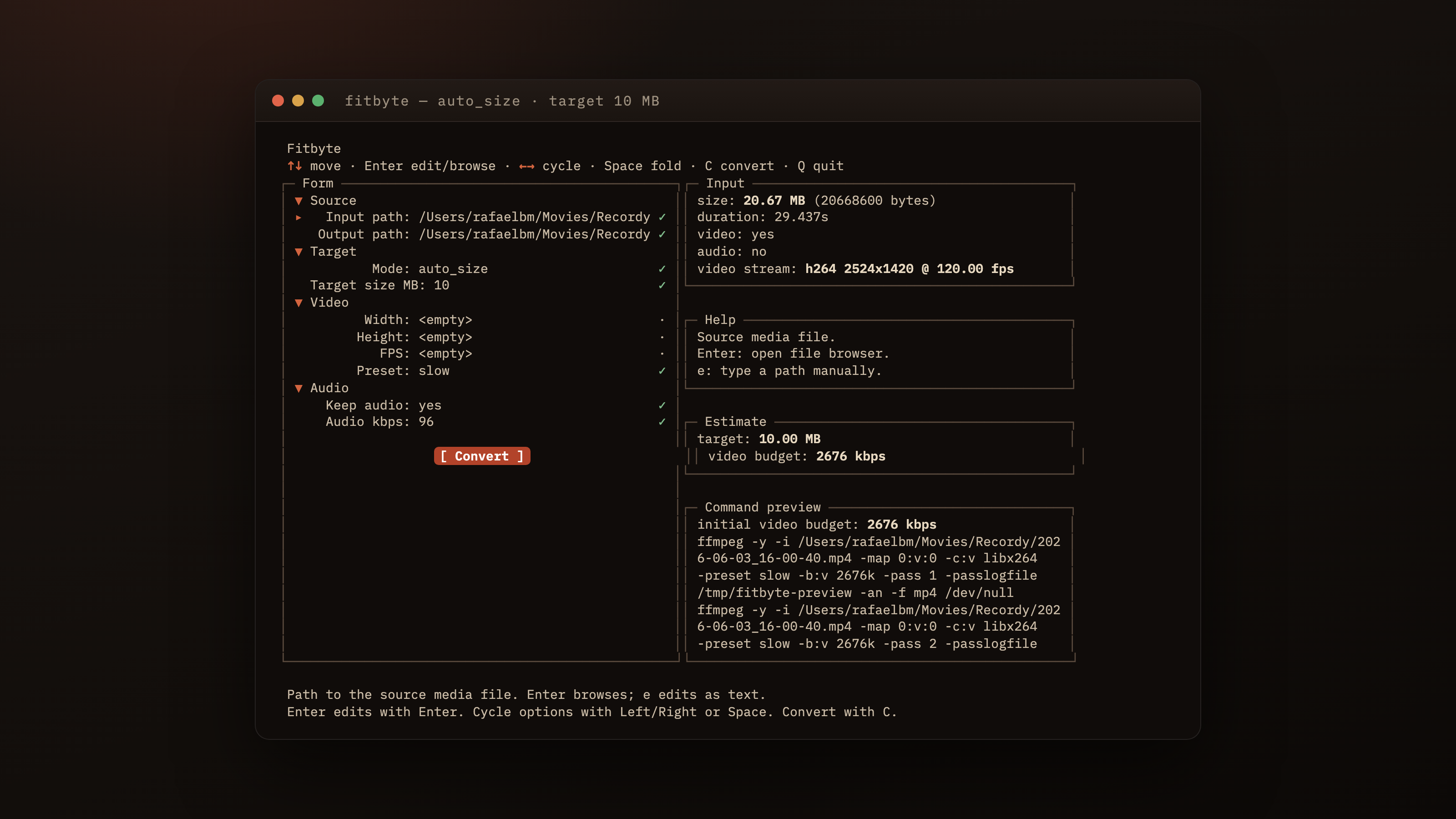
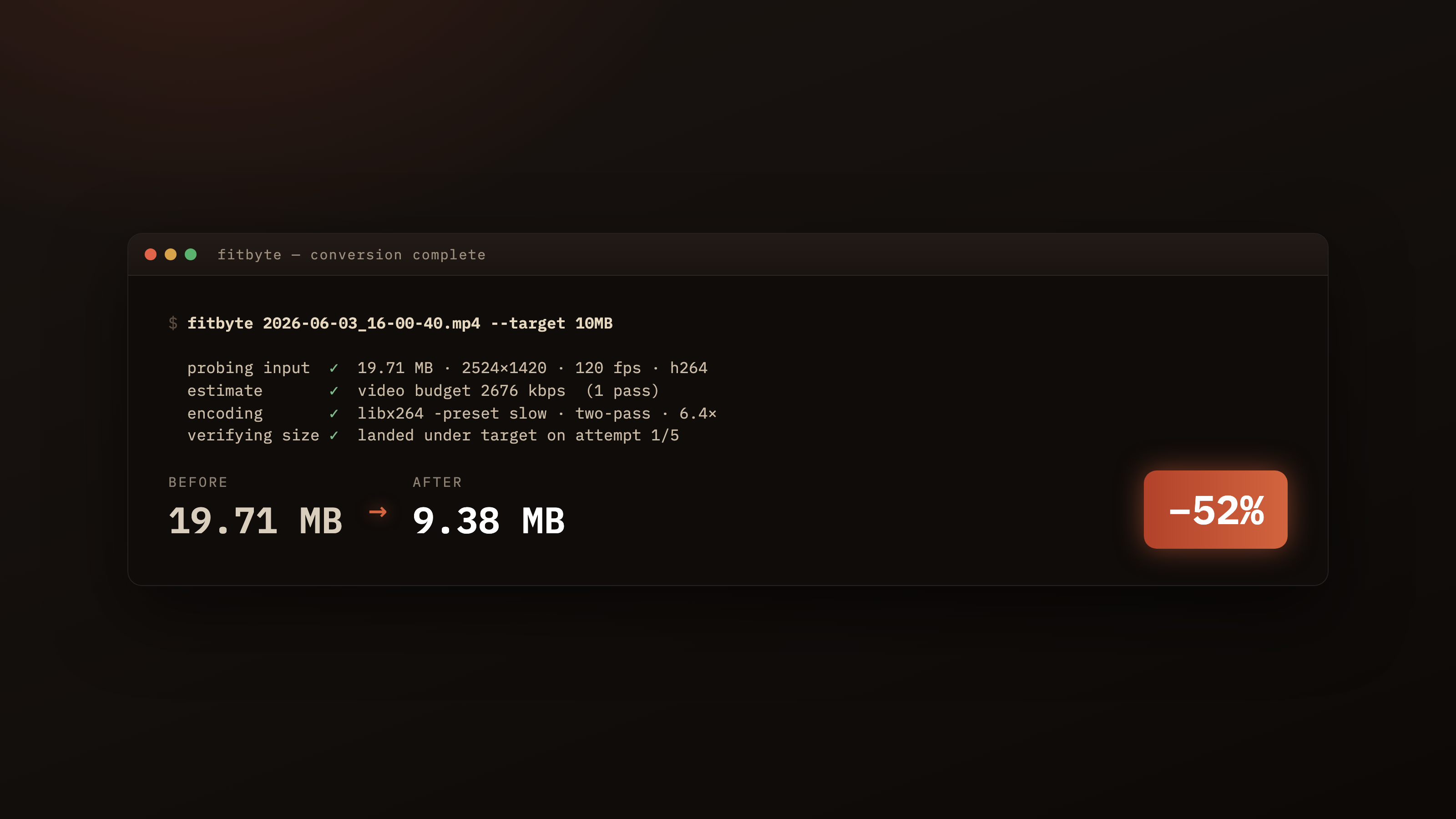
After pass 2, Fitbyte measures the real output. If it landed inside 96.5% to 100% of target, that's a hit. Otherwise it scales the bitrate by target / actual, re-applies the 0.985 margin, and reruns the two-pass, up to five attempts. In practice it converges in one or two; the cap is paranoia more than need. The 96.5% threshold isn't arbitrary either: libx264's VBV behaviour tends to overshoot an exact target by 1–3%, and the headroom on the ask lands most inputs inside the budget on the first try.
Audio-only outputs are simpler. No two-pass is needed: a single-pass libmp3lame / aac / libopus encode runs under the same iterative bitrate-scaling loop. Lossless codecs (pcm_s16le for .wav, flac for .flac) refuse auto-size at validation. There's no bitrate knob to turn, so there's nothing the loop can do.
Knobs You Can Turn
Auto-size answers the size question, but most of the time you want to nudge other things too, and the CLI flags group by the question they answer.
How small? --target-size-mb, a float, default 10. The whole point of the tool.
How sharp? --width, --height, and --fps. Set width alone and aspect ratio is preserved via scale=W:-2; the -2 lets libx264 pick an even height without you doing arithmetic. Fewer pixels means the encoder has fewer places to spend bits, which usually reads sharper at the same target size.
How patient? --preset with medium, slow, or veryslow, default slow. Slower presets buy better quality at the same bitrate by spending more CPU. There's no ultrafast on purpose: if you're chasing a size target, you want the encoder to actually try.
What about audio? --audio-bitrate-kbps to override the defaults (96 kbps for opus, 128 kbps elsewhere). --no-audio drops the track entirely, the cleanest way to save bits on a silent clip.
Manual override? --mode manual switches off the loop and hands you either --crf (default 23) for a quality-targeted encode or --video-bitrate-kbps for explicit bitrate. The two are mutually exclusive; setting both is an error.
--dry-run prints the assembled ffmpeg invocation and exits without encoding, good for a sanity check or for copy-pasting into a shell script. --no-overwrite errors instead of replacing an existing output. Three JSON modes (--probe-json, --preview-json, --progress-json) emit structured output for callers driving Fitbyte from another program.
Why I Built It This Way
I already live in a terminal, so a GUI would have been a context switch, the kind you re-learn every time you haven't opened the app in a month. A terminal app fits where I already am, scripts cleanly into shell loops, and survives ssh. The TUI on top of the CLI is the same idea twice: a curses front-end makes one-off encodes pleasant, and the flag interface makes batch jobs just work. The reason it refuses online converters' whole premise is the same reason I wrote it: for anything personal, a recording or a clip with a friend in it, uploading to a stranger's box to dodge a size cap is a worse deal than the cap was.
Things I'd Change
I'd reach for Textual over curses next time. Modern Python TUI frameworks hand you box-drawing, colors, mouse handling, and focus management for one dependency; the hours spent wiring layout primitives by hand would have gone further elsewhere. The five-attempt convergence cap was paranoid, since it almost always settles in one or two; three would do. Auto-size for .webm / VP9 would be a useful add, since right now auto-size is h264 only on the video side. And tests landed late: tests/test_app.py covers validation and the no-overwrite / auto-retry paths, but the pure functions that would have been easiest to pin first (initial_auto_budgets, scale_bitrate, the command builders) are still uncovered. Test-first would have saved real time.
When to Reach for It
Good fit:
- You need to shrink an audio or video file under a platform upload cap.
- You want to batch-encode a folder with a shell loop and
--target-size-mb. - You're extracting audio-only output and want it inside a size budget.
- You already have
ffmpeginstalled and want to stop googling the right flags.
Not for:
- Lossless workflows: auto-size refuses lossless codecs at validation.
- File types outside the supported audio and video list. No PDFs, no images, no archives.
- VP9 or AV1 video in auto-size mode. Auto-size is h264 only today.
- GUI-only users. The macOS shell helps, but it's a thin wrapper around the same engine; if you won't touch a terminal at all, this isn't the tool.
Built with Claude Code
This tool was designed, written, and iterated on with Claude Code as the primary author.